Free VPN for Windows 10 and 11
Connect to the fastest server in one click. Auto-connect and a kill switch keep you covered on any Wi-Fi.
Version · · Signed installer
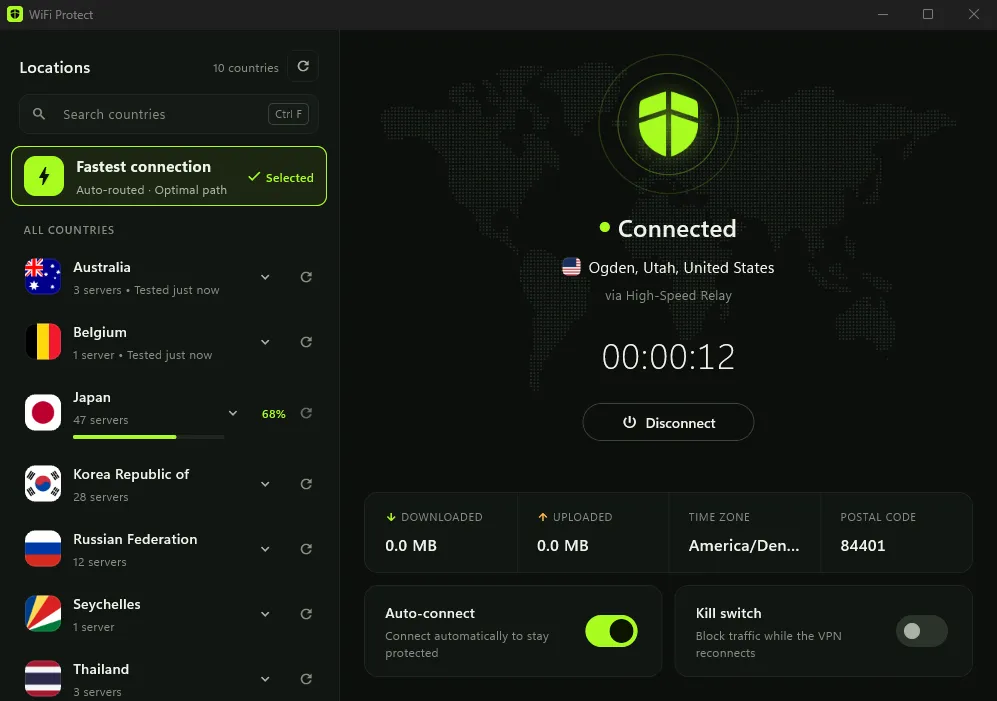
What you get on Windows
Fastest connection
Servers are tested live, and the fastest one is picked for you.
Auto-connect
Connects as soon as the app starts, so you're protected from the start.
Kill switch
Blocks internet traffic while the VPN reconnects.
Choose a country
Or let the app choose. Press Ctrl F to search the country list.
Automatic updates
The app checks for a new version every day and installs it for you.
No account
No email, no payment details, no sign-up.
Install in a minute
- Download the installer with the button above.
- Open it and approve the administrator prompt. It installs the WiFi Protect service and a network adapter for the VPN connection.
- WiFi Protect opens by itself when setup finishes. Click Connect.
Seeing "Windows protected your PC"?
Windows shows this for new apps until enough people have installed them. Click More info, then Run anyway.
System requirements
- Windows
- 10 (version 22H2) or 11
- Processor
- 64-bit (x64)
- ARM PCs
- Not supported
- Installation
- Administrator approval
- Updates
- Automatic, checked daily
Uninstall at any time
Open Settings, then Apps, then Installed apps (on Windows 10: Apps & features), select WiFi Protect and choose Uninstall. This removes the app, the WiFi Protect service and its network adapter. The firewall and DNS rules WiFi Protect uses exist only while you are connected.
Windows questions
Also on Android and Fire TVIs WiFi Protect for Windows free?
Yes. WiFi Protect is 100% free, forever. There are no hidden fees, no premium tiers, no in-app purchases, and no time limits.
Windows says "Windows protected your PC". Is the installer safe?
Windows SmartScreen shows this message for apps that few people have installed so far. The installer is digitally signed. Click More info, then Run anyway to continue.
Does it run on ARM-based Windows PCs?
Not at the moment. The installer needs a 64-bit (x64) PC running Windows 10 version 22H2 or Windows 11.
Does it work on Windows 7 or 8?
No. WiFi Protect needs Windows 10 version 22H2 or Windows 11.
How do I update WiFi Protect?
You don't need to. The app checks for a new version every day and installs it for you. The Windows download on wifi-protect.com always gets the newest version.