Do you need a VPN on Windows 11?
By the WiFi Protect team · Published · Updated
Short answer
Yes, if you use Wi-Fi outside your home or want privacy from your internet provider. Windows 11 guards your PC against malware with its firewall and SmartScreen, but it does nothing to keep the networks you join from seeing which sites you visit. A VPN adds that privacy on every network, from the café to the hotel to your own broadband.
Free · no account · Windows 10 and 11, 64-bit
What does Windows 11 already protect?
Windows 11 is good at protecting your PC itself, and several protections are on from the start. What it doesn't cover is your privacy on the networks you connect to:
| Protection | Status | What it does |
|---|---|---|
| Windows Firewall | On by default | Blocks unrequested incoming connections to your PC.[1] |
| New Wi-Fi networks set to Public | On by default | Hides your PC from other devices on the network and turns off file and printer sharing there.[2] |
| SmartScreen in Microsoft Edge | On by default | Warns about and blocks known phishing and malware sites and downloads.[3] |
| Encrypted DNS (DNS over HTTPS) | You set it up | Encrypts the lookups for site names. Only offered once you enter your own DNS servers.[4] |
| Random hardware addresses | Check it’s on | Uses a different Wi-Fi address so public networks can’t follow your device around.[5] |
| Privacy on the networks you join | Not included | The Wi-Fi you’re on and your internet provider can still see which sites you visit. Windows can connect to a VPN, but doesn’t include one.[6] |
Microsoft is clear that the built-in VPN option is only a connector: "Before you can connect to a VPN, you must have a VPN profile on your device."[6]Encrypted DNS isn't switched on by itself either; Microsoft says "By default, Windows 11 will defer to the local administrator on which resolvers should use encrypted DNS."[4]
What does a VPN add on Windows 11?
Privacy from every network you use. A VPN encrypts everything between your PC and the VPN service, including the lookups for site names. The café's Wi-Fi, a fake hotspot made to look like the real one, or your internet provider then only see that you're connected to a VPN, not which sites you visit.
That's why Microsoft's own advice for public networks is: "If you have to use a public Wi-Fi network you should consider using a Virtual Private Network (VPN)."[7]
Is a VPN useful at home too?
Yes, if you'd rather your internet provider didn't see which sites you visit. Your home network isn't shared with strangers, so at home the gain is privacy from your provider. And with a VPN that connects as soon as it starts, your laptop is already protected the moment you take it to a café, a hotel or an airport.
How do you tell a free VPN you can trust?
Where a VPN comes from matters more than its price, because a VPN sees what the network no longer can. As the US Federal Trade Commission puts it: "It just shifts trust from those networks to the VPN app provider."[8]
Bad ones exist. In 2024 the FBI described how "Free, illegitimate VPNs were packaged within pirated video games and software" and "installed silently on victims' devices without their consent", turning them into part of a criminal proxy network with over 19 million compromised IP addresses in more than 190 countries.[9]A 2026 study of 281 popular Android VPN apps found that 61 sent some data without encryption,[10] and Germany's Federal Office for Information Security warns: "Often, users of free VPNs end up 'paying' for the service with their personal data, which can be used for purposes such as marketing."[11]
These are the signs of one you can trust, and how WiFi Protect meets them:
| Sign of a VPN you can trust | WiFi Protect |
|---|---|
| You download it from its maker’s own website or the Microsoft Store, never bundled with other software. | WiFi Protect for Windows comes only from wifi-protect.com. |
| The installer is digitally signed, so Windows can show who published it. | Our installer is signed. |
| It keeps itself up to date. | The app checks for a new version every day and installs it. |
| It says plainly what it does with your browsing. | Our policy: we don’t track, collect or store your browsing activity. |
| It doesn’t ask for more than it needs. | No account, no email, no payment details. |
What about Microsoft's own VPN?
Windows 11 itself doesn't include one. The VPN that came with Microsoft Defender for Microsoft 365 subscribers was retired: "The privacy protection (VPN) feature within Defender is going away February 28, 2025."[12]Microsoft Edge has a Secure Network option, but it protects browsing in Edge only, not your other apps. Microsoft says "You get 5GB of free data per month with your personal Microsoft Account", and that it is not available for managed devices or in certain regions.[13]
What a VPN doesn't replace
A VPN protects your connection, not the PC itself: keep Windows Security and SmartScreen on against malware and phishing. It also doesn't hide who you are from the sites and accounts you sign in to.
A Windows 11 checklist
- Keep Windows and your browser updated; turn on automatic updates.
- Leave the firewall on, and let new Wi-Fi networks stay Public.
- Turn on random hardware addresses: Settings, Network & internet, Wi-Fi.
- Use a password manager and two-step sign-in on your important accounts.
- Install a VPN you trust and let it connect when the app starts, so every network you join is covered.
Where WiFi Protect fits
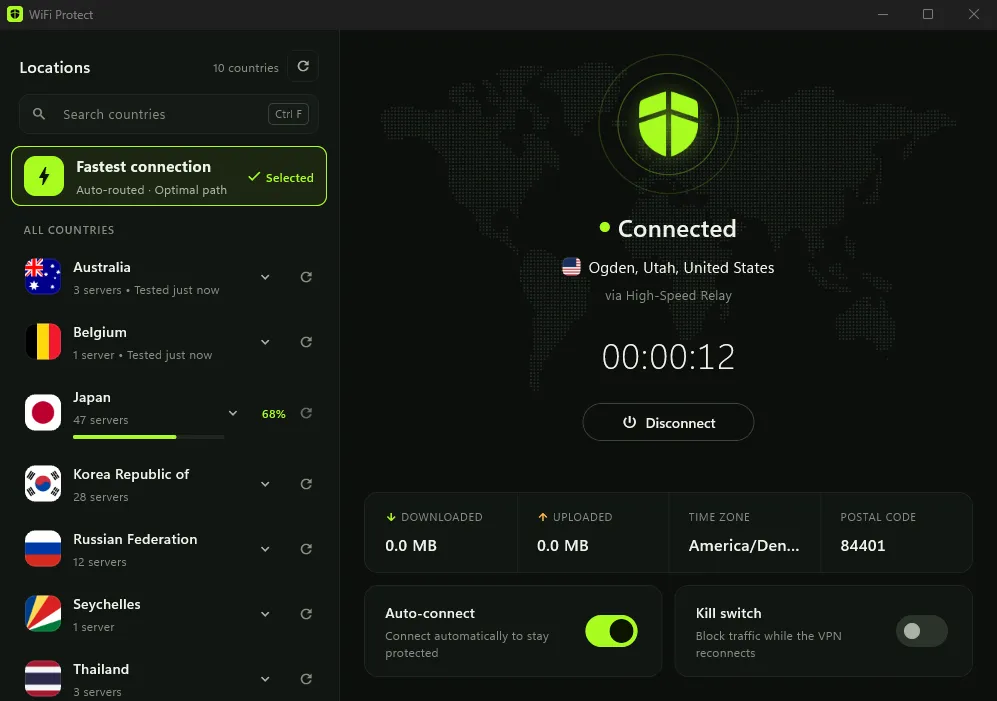
WiFi Protect is our free VPN for Windows 10 (version 22H2) and Windows 11 on 64-bit PCs. It connects to the fastest server in one click or to a country you choose, and it sends your traffic and the lookups for site names through the encrypted connection. It connects as soon as the app starts if you like, a kill switch blocks traffic while the VPN reconnects, and the app updates itself. No account, no data cap, and we don't log your browsing activity.
Sources
- 1Microsoft Learn, "Windows Firewall overview"
- 2Microsoft Support, "Essential Network Settings and Tasks in Windows"
- 3Microsoft Learn, "Microsoft Edge support for Microsoft Defender SmartScreen"
- 4Microsoft Learn, "Windows 11 security book - Network security"
- 5Microsoft Support, "Connect to a Wi-Fi network in Windows" (random hardware addresses)
- 6Microsoft Support, "Connect to a VPN in Windows"
- 7Microsoft Support, "Be safer over wireless connections"
- 8Federal Trade Commission, "In the market for a VPN app?", 22 February 2018
- 9FBI Internet Crime Complaint Center, "Guidance on the 911 S5 Residential Proxy Service", 29 May 2024
- 10NDSS Symposium 2026, "MVPNalyzer: An Investigative Framework for Auditing the Security & Privacy of Mobile VPNs"
- 11BSI (German Federal Office for Information Security), "Virtual private Networks (VPNs)"
- 12Microsoft Support, "End of support-Privacy protection (VPN) in Microsoft Defender for individuals"
- 13Microsoft Support, "Use the Microsoft Edge Secure Network to protect your browsing"